
OSHA NIOSH Heat Safety Tool
Centers for Disease Control and PreventionWeather
3.1287.00 Reviews
- Version
- 3.5
- Installs
- 100.00K
- Age Rating
- Everyone
Screenshots
Our Review of OSHA NIOSH Heat Safety Tool
 Analysis by Appyee
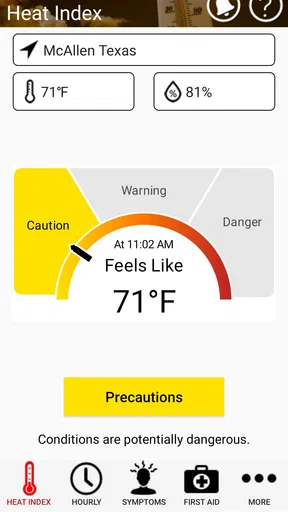
On a hot workday, the difficult part is not simply noticing that the air feels uncomfortable. The useful question is what that heat means for the people who must keep working, how serious the risk may be, and what should happen next. I found OSHA NIOSH Heat Safety Tool most useful in that exact moment: it turns a heat-index reading into a practical risk level and worksite guidance instead of leaving me with a temperature number that is hard to interpret.
This is a free weather app from the Centers for Disease Control and Prevention, aimed less at casual forecasts and more at heat-safety decisions. Its store summary focuses on calculating the heat index and connecting it with associated risk-level recommendations for worksites. That narrow purpose is also its main strength. I would not install it as my everyday replacement for a full weather service, but I would keep it available if I supervised outdoor work, planned physically demanding tasks, or wanted a straightforward way to discuss heat exposure with a team.
From a hot morning to a practical work decision
I start with a familiar shared-use situation: one person checks the heat before work, while someone else has to turn that result into a plan for the group. The useful habit is to pass along the meaning, not just the number, so the person making the decision can connect it to the actual task. That handoff leads naturally to a closer look at who should enter conditions and how carefully they should be checked.
The starting condition: temperature alone is not enough
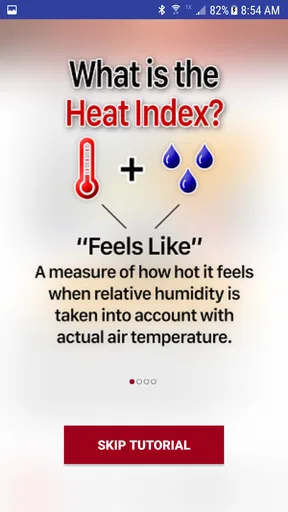
My first impression is that this app makes more sense when someone already has a concrete heat concern. Perhaps a crew is preparing to repair a roof, a coach is organizing outdoor training, or a manager is deciding whether a labor-intensive task should begin now or later. In each case, looking at the air temperature alone can give a false sense of precision. Humidity changes how hot conditions feel and how difficult it is for the body to cool itself, which is why the heat index is more useful for this kind of decision.
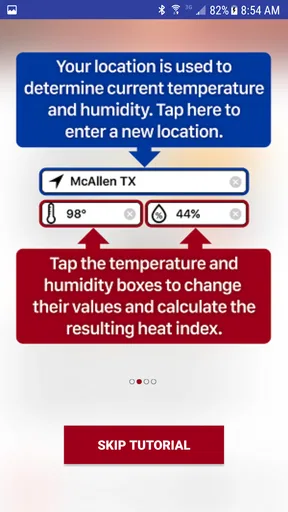
The app’s role is focused: I use it to calculate that combined heat effect and then read the corresponding risk level and worksite recommendations. That makes it different from a general forecast app, where heat may appear as one card among rain chances, wind, hourly temperatures, radar, alerts, and several other details. Those broader services are better for planning the whole day. This tool is better when the immediate question is, “How should we respond to this heat while people are working?”
I also appreciate that the product comes from the Centers for Disease Control and Prevention rather than presenting itself as a lifestyle gadget. That does not make every result automatically suitable for every person or workplace, but it gives the app a clear public-health purpose. I treat its recommendations as a decision aid, not as permission to ignore symptoms, local rules, medical advice, or a worker’s condition.
Step one: enter conditions carefully
The quality of the outcome begins with the information entered. I would not rush through this part while standing beside a noisy job site. A reading taken in shade, a report from a nearby weather service, or a thermometer placed in direct sun can describe noticeably different conditions. The app can calculate from the values supplied to it, but it cannot correct a poor measurement or know whether the number represents the exact location where people will work.
That is an important practical distinction. A supervisor may check conditions near the office and assume they apply to a paved roof, an enclosed loading area, or a field with little shade. I would use the most relevant local reading available and make sure the team understands where it came from. The calculation is only as useful as the situation it represents.
When I use a heat-index calculator, I also pause before treating the output as a universal answer. Heat risk changes with clothing, physical effort, acclimatization, access to water and shade, and the health of the people involved. The app gives the heat-related risk level and worksite recommendations associated with the entered conditions, but a real supervisor still has to connect that information to the actual task.
Step two: read the risk level as an action prompt
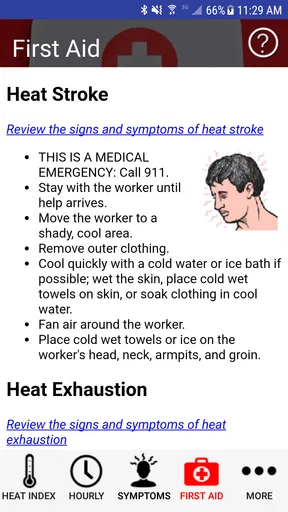
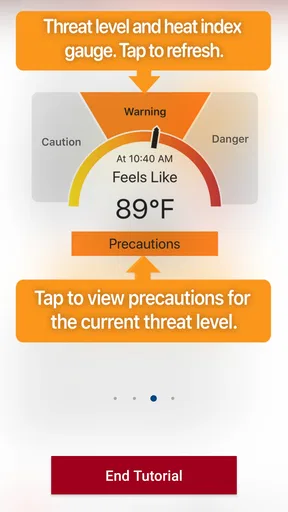
The most valuable part of the workflow is not the calculation itself. It is the translation from a number into behavior. Instead of stopping at “the heat index is high,” I look at the associated risk level and recommendations, then ask what needs to change before work continues. That might mean reconsidering the timing of strenuous tasks, planning more deliberate recovery periods, checking that water is available, or making sure workers know what warning signs deserve immediate attention.
This is where the app can improve a conversation. A vague warning such as “it is really hot today” often leads to inconsistent decisions. A displayed risk level gives a group something specific to discuss. It can help a supervisor explain why a routine schedule needs adjustment, or why a new worker should not be treated exactly like someone already accustomed to hot conditions.
I would not use the recommendation screen as a substitute for observation. Someone who looks confused, unusually tired, dizzy, or unwell needs attention regardless of what the app displays. The heat index is an environmental indicator, not a diagnosis. In my view, the safest workflow is to use the app before and during planning, then keep watching the people rather than the screen.
Step three: turn the result into a shared plan
A useful but easy-to-miss advantage of a focused tool like this is that the result can become a common reference point between people who do not normally use the same weather app. A site manager can check the conditions, a lead worker can review the recommendation, and the crew can agree on when to pause or reassess. The handoff is clearer when everyone is looking at the same risk category instead of comparing different forecast layouts.
For a small landscaping team, I would use the app before assigning the day’s heaviest tasks. If the risk level suggests greater caution, I would place the most demanding work during the more manageable part of the schedule, identify a shaded recovery area, and make water access part of the plan rather than an afterthought. I would then check conditions again if the work lasts long enough for the environment to change. The app does not organize that entire operation for me; it gives me a concise basis for making the plan.
For an event organizer, the handoff looks different. The person checking conditions may not be the person supervising volunteers or athletes. In that situation, I would record the result in plain language and pass along the recommended precautions, rather than sending only a screenshot with no explanation. The point is not to make everyone become a weather expert. It is to make sure the person responsible for the group knows what the risk level means for the activity.
What the result is good for
The result is strongest as a quick operational checkpoint. It helps answer whether current heat conditions deserve ordinary awareness or a more deliberate safety response. Because the app connects the calculation with worksite recommendations, I do not have to translate the heat index entirely on my own. That saves time compared with searching through general articles every time conditions become uncomfortable.
I also see value in using it as a teaching aid. A new supervisor can learn that heat safety is not just about the thermometer reading. A crew can discuss why humidity matters, why strenuous work changes the situation, and why breaks and hydration should be planned before anyone feels ill. Used this way, the app supports a repeatable routine rather than a one-off glance.
Its focused design can also reduce distraction. A general weather app may tempt me to keep checking unrelated forecast details, while this tool keeps attention on heat exposure and the worksite response. That simplicity is helpful when a decision needs to be made quickly and the people involved do not need a full weather dashboard.
Where the workflow breaks down
The same narrow focus that makes the app useful also limits it. It is not the right choice when I need a complete forecast for travel, rain planning, storm tracking, wind-sensitive work, or a detailed hourly schedule. A conventional weather app is better for those questions. I would use the broader service to understand the day and this calculator to focus specifically on heat risk.
The app also depends on human input and judgment. If someone enters conditions from the wrong location, forgets that the work area is hotter than the surrounding air, or treats the result as a guarantee of safety, the workflow can fail even if the calculation is correct. This is not a criticism of the arithmetic; it is a reminder that the tool sits inside a larger process.
Another friction point is the handoff from recommendation to enforcement. A risk level may suggest a safer approach, but the app cannot make a contractor change a deadline, ensure that a shaded area is actually usable, or confirm that every worker has access to water. Those responsibilities stay with the people running the site. I would be wary of any workplace that displays the result but does not assign someone to act on it.
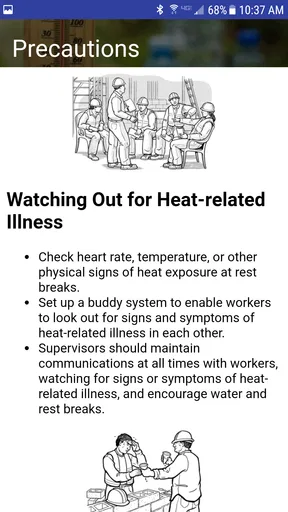
There is also a human limitation that no heat-index screen can remove. Two people can face the same conditions and respond differently, especially if one is new to the environment, wearing protective clothing, performing heavier work, or managing a health concern. The app helps identify environmental risk, but it should never become a reason to dismiss a worker’s report that something feels wrong.
Who should use it, and who should skip it
I think OSHA NIOSH Heat Safety Tool is a good fit for outdoor supervisors, maintenance teams, construction planners, agricultural workers, event staff, coaches, and anyone who needs a compact heat-safety reference rather than a full forecast. It is particularly useful for people who want a shared procedure: check the conditions, calculate the heat index, read the risk level, communicate the recommendation, and reassess when circumstances change.
It can also suit an individual who works outside and wants a clearer basis for raising a heat concern with a manager. The app gives the conversation structure without requiring the worker to interpret a complicated weather chart. I would still encourage that person to follow workplace procedures and seek help immediately if symptoms appear.
I would skip it if my main need were radar, rain timing, severe-weather notifications, pollen information, long-range planning, or a polished daily forecast. It is also not enough by itself for medical decisions or emergency response. In those situations, a general weather service, an official emergency channel, a workplace safety program, or a qualified health professional may be the more appropriate resource.
Compatibility, cost, and everyday practicality
The app is free and rated for Everyone, which makes it easy to consider for mixed-age teams and shared workplace devices. It requires Android 8.0 or later, so anyone using an older phone should check compatibility before depending on it in the field. The current version is 3.5, and the product has been available since May 23, 2017, giving it a long enough presence to feel like an established utility rather than a temporary seasonal experiment.
Its reach is modest but meaningful: it has passed one hundred thousand installs. The average rating is 3.1 from more than five hundred ratings, with over two hundred reviews. I read that middle-of-the-road reception as a useful warning against expecting a polished mainstream weather experience. This is a specialized tool with a practical purpose, and people who want richer forecasting or smoother presentation may find it less satisfying.
For me, the free price matters because the app is most valuable when several people can use the same safety routine without a subscription decision. A crew leader can keep it ready for hot days, while a supervisor can use a broader weather app for everything else. That combination makes more sense than forcing one application to handle both detailed forecasting and heat-specific guidance.
Small workflow improvements that make a difference
I would prepare the handoff before the temperature becomes uncomfortable. Decide who checks the conditions, who communicates the risk level, and who can change the work plan. Without those roles, even a clear recommendation may sit on one person’s phone while everyone else continues as normal.
I would also avoid checking only once at the start of a long shift. A morning result can become less representative as humidity, sunlight, workload, or location changes. The app is more useful when treated as a checkpoint that can be repeated, not as a permanent label for the entire day.
Finally, I would pair the result with a short verbal briefing. Tell people what the risk level means for the planned task, where water and shade are located, when the next reassessment will happen, and whom to contact if they feel unwell. That turns a calculation into a safety action. The app cannot perform that briefing, but it can make the briefing more concrete.
My final view after using the full process
The best way to think about this app is as a heat-risk translator, not a complete weather service. It starts with local conditions, produces a heat-index result, connects that result to a risk level, and gives worksite recommendations that can guide a real conversation. That sequence is simple, but it addresses a problem that general weather apps often leave to the user.
I recommend OSHA NIOSH Heat Safety Tool to anyone responsible for outdoor or heat-exposed work who wants a focused, free reference for planning and communication. I would not rely on it alone, and I would not choose it for normal day-to-day forecasting. Its value appears when a person takes responsibility for the next step: adjusting the task, arranging recovery, communicating clearly, and watching the workers rather than assuming the screen has made the decision.
That balance is why I find it worthwhile despite its limitations. It does not try to do everything, and it cannot replace judgment. But when the question is how current heat conditions should influence a worksite plan, it gives me a more useful starting point than a temperature reading by itself.
Verdict
Strengths of OSHA NIOSH Heat Safety Tool
- Uses official OSHA and NIOSH heat-safety guidance.
- Provides heat index readings based on location and weather data.
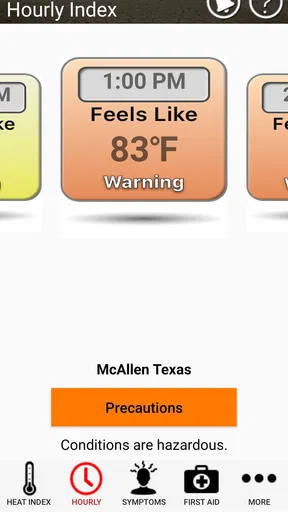
- Offers hourly forecasts to help plan outdoor work.
- Includes reminders for hydration, rest, and heat illness prevention.
- Useful for workers, supervisors, and outdoor activity planning.
Limitations of OSHA NIOSH Heat Safety Tool
- Accuracy depends on reliable location and weather-data access.
- Some safety guidance may feel repetitive for experienced users.
- Does not replace a formal workplace heat-safety program.
- Limited usefulness for indoor environments with unusual heat sources.
- Notifications and location features may increase battery usage.
Similar Picks in This Category
View All
Weather - By Xiaomi
Xiaomi Inc.4.1

Weather & Radar Forecast
WetterOnline4.8

Weather
OneLouder Apps4.6

AccuWeather: Weather Radar
AccuWeather3.6

The Weather Channel - Radar
The Weather Channel4.6

1Weather Forecasts & Radar
OneLouder Apps4.3
Frequently Asked Questions
What is the OSHA-NIOSH Heat Safety Tool?
The OSHA-NIOSH Heat Safety Tool is a workplace safety app designed to help people recognize and manage heat-related risks. It provides a heat index or “feels like” temperature, risk-level guidance, and practical recommendations for staying safe in hot conditions. It is especially useful for outdoor workers, supervisors, employers, and anyone exposed to heat during work or daily activities.
How does the app determine heat risk?
The app estimates heat risk using current or selected weather information, including temperature and humidity, and may use your device location to provide local conditions. It presents the result through risk categories and safety recommendations. Conditions can change quickly, so the app should be checked regularly and used together with workplace procedures, shade, hydration, rest breaks, protective equipment, and professional medical advice when necessary.
Does OSHA-NIOSH Heat Safety Tool work without an internet connection?
The app’s most useful features generally depend on current weather information, location services, or an internet connection. If connectivity is unavailable, you may not receive updated local conditions or accurate heat-risk information. Users working in remote areas should plan ahead, review expected weather before starting, and follow established heat-safety procedures rather than relying on the app as their only source of information.
Who should use the OSHA-NIOSH Heat Safety Tool?
The tool is intended for anyone who may be exposed to hot and humid conditions, with particular value for construction workers, agricultural employees, delivery personnel, landscapers, emergency responders, and outdoor supervisors. Employers can also use it when planning work activities and communicating risks. It is helpful for awareness, but it does not replace a formal heat illness prevention program or trained safety personnel.
Can this app prevent heat exhaustion or heat stroke?
No app can prevent heat illness by itself. OSHA-NIOSH Heat Safety Tool helps users identify dangerous conditions and understand recommended precautions, but safety depends on taking action. Drink water regularly, take appropriate rest breaks, use shade or cooling areas, wear suitable clothing, and watch for symptoms such as dizziness, confusion, weakness, or nausea. Suspected heat stroke requires immediate emergency medical assistance.
